The translation was generated automatically and may contain mistakes
Plugins for Communities
Plugins are a type of embedded application on the VK Mini Apps platform that work within the context of the community and extend its capabilities. They help automate the work of community administrators, add scripts for subscribers and connect external services.
The plugin is configured for a specific community. For example, in the delivery plugin, the menu of only the restaurant for which the community was created is displayed. At the same time, the plugin interface depends on the role of the user: the administrator manages the menu and delivery settings, the subscriber selects positions and makes an order.
Plugins can be monetizing promote through advertising and place in a special catalogue .
Important! Placing plugins for communities in Odnoklassniki through the VK Mini Apps platform is not available. Applications for groups in Odnoklassniki are created directly on the ok.ru website.. More details in the documentation API Classmates .
How Plugins Work
The plugin has two main use cases:
- •The community administrator installs the plugin and configures it.
- •The user (community subscriber) uses the plugin in a configured configuration.
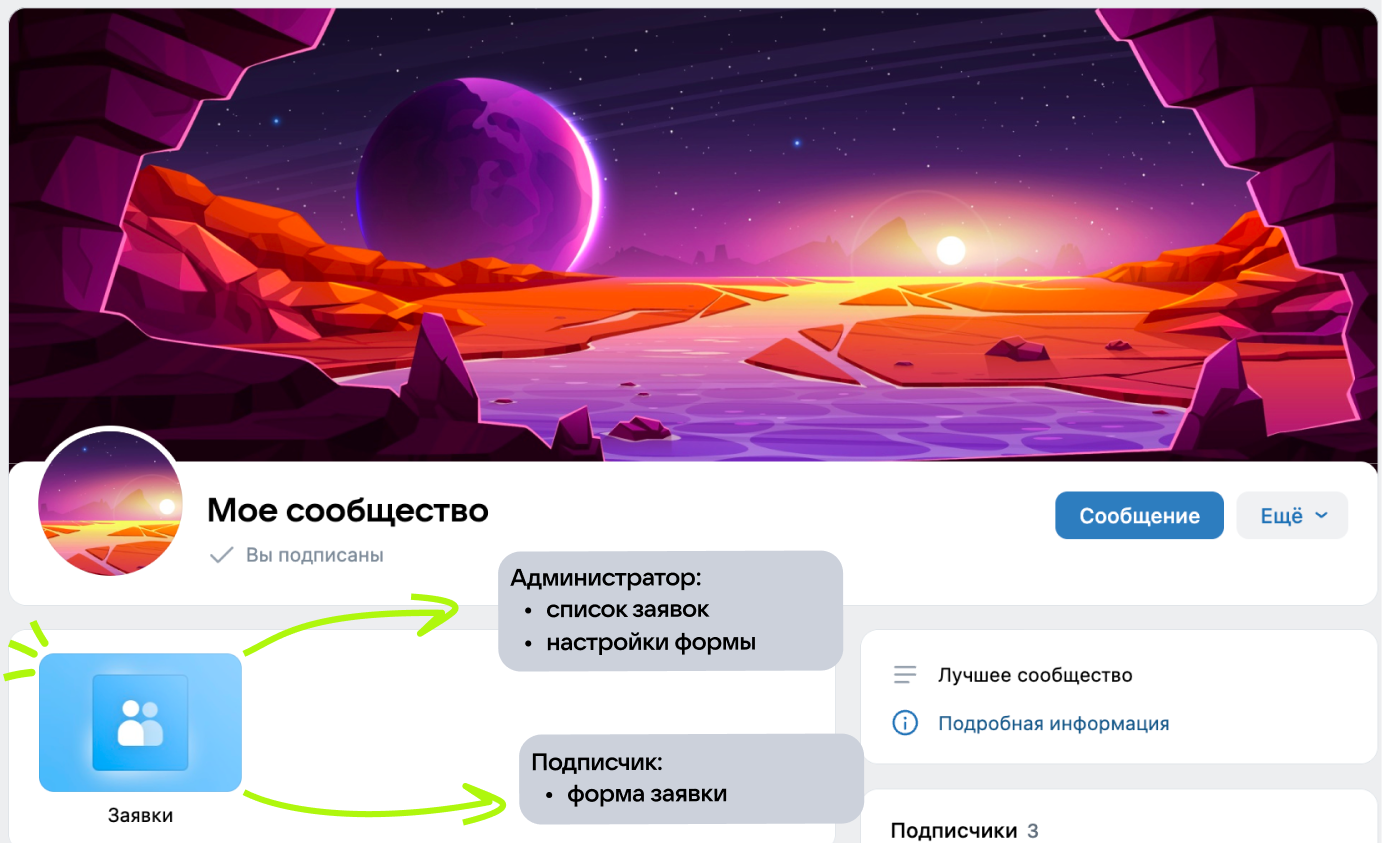 Plagin in community
When installed in the community and launched by users, the plugin receives startup settings . By them, it defines the community and the role of the current user and shows the corresponding interface.
Restrictions
- •The plugin only works properly in context of Community .
- •Plugins can only be placed in a special plugin Directory .
- •No more than 5 plugins can be added to the community.
Context of Community
The plugin can open in two modes:
- •
In a community context, when a plugin is running within a community and receives its identifier. The user sees only those features that are available to his role in this community.
If the user does not have access to the closed community, the plugin will open with a direct link without context.
- •
Without context — when running from sources that don’t pass the community ID. The user will see only the screen with the offer to install the plugin in the community.
The context is needed so that the plugin understands what community it is running for and shows the desired interface: settings and tools for administrators, user mode for subscribers.
Role model
Use the user’s role in the community to manage access to features. For example:
- •Show settings and advanced features only to community administrators.
- •Display different scenarios depending on the role of the user.
- •Show certain content only to community subscribers.
More information about the launch parameters and work with VK Bridge - in the section Addition to the community .
You can’t restrict access to features by requiring you to subscribe to a community.
Opportunities of the Platform
Widgets
The plugin can be displayed on the community page as a widget. The widget is suitable for scenarios where it is important to display some of the data from the plugin directly on the community page: schedule, statuses, collections, counters, product and service cards.
The widget usually complements the plugin: the user sees brief information in the community and goes to the plugin for details and actions.
Examples of plugins with widgets:
- •
- •
- •
- •
More about setting up widgets — in the section Community widgets .
Community Messages
Community messages help to contact the user after they have closed the plugin.
Messages can be sent to both users and community administrators. For example, a plugin can send a message to everyone who filled out a form and notify the community administrator of a new application.
You can attach images, documents, video, audio and a point on the map to the message.
More details in section Community Messages .
Monetization
Monetize the plugin so that the terms are clear to the community administrator and consistent with the platform’s rules. For example, subscription to advanced features or rates for communities by number of users.
Recommendations:
- •Describe what is included in the free mode and what is paid.
- •Leave the option to install the plugin and get acquainted with it without payment.
- •Think about the behavior at the end of the subscription.
More details in section Monetization of mini-applications on the VK Mini Apps platform .
Plugin Catalog
A directory is a showcase of plugins for communities. The administrator can access the plugin directory from the community settings or through a direct link: vk.ru/community_apps .
Only those plugins that have been moderated fall into the directory. At the same time, moderator approval does not guarantee publication: some of the verified plugins are not displayed in the directory.
- •
- •
If the plugin has not been moderated, you can install it only by a direct link. Such a plugin will be marked as unverified.
Materials on the topic
- •
- •
- •
- •

