Publishing on OK
One opportunity to increase the user base of a mini app or a game is to make it available on other platforms, such as the OK (ok.ru) social network. Here's how to do that.
Step 1. Register your app on the VK Mini Apps platform
More on registering games and mini apps:
- •
- •
Step 2. Connect the app to OK
Only the creator of the app can connect it to OK.
App creator must have a developer profile in the OK social network to set up publication.
- 1.
Open the app list and go to your mini app's or game's settings.
- 2.
In the left-hand menu, select Settings → Other platforms.
- 3.
Click on Connect OK ID. If you haven't signed in to OK, you will see a sign-in dialog box. Fill in the fields and click on Sign in.
- •
If it's your first time connecting an app to OK, you will see a dialog box with the agreement on providing you with developer rights. Read the agreement and click on Obtain developer rights.
- •
If you have previously connected an app to OK and already have developer rights, you will see a message saying, "Developer rights provided". To connect your app, click Confirm.
- •
The identifier of the connected developer profile from OK will be displayed in the Other platforms section. Within 15 minutes, VK Mini Apps will create a mini app on OK. Creator will be able to launch this app using a direct link. For more details, see Step 3. Test the app.
Step 3. Test the app
An app can be tested on OK before its publication only by its creator.
You can test your app on OK even before requesting moderation. To open the app on OK, do the following:
- 1.
Make sure that the Placement section contains the addresses for the platforms your app should work on.
- 2.
Copy the link to the app on OK from the control panel widget on the right.
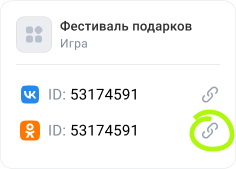 Control panel widget
 - 3.
Click the link to test the app.
Step 4. Send the app to moderation
Request for moderation can be sent by the app admin with one of the following roles:
- •
Creator.- •
Admin with full access.- •
Admin with limited access having the Moderation rights.
To send the app for review, go to the Moderation section in the control panel.
- •
If your app has already passed moderation, review and placement statuses will be indicated in the Catalog placement table.
To request moderation on OK, select For moderation in the corresponding line. Add a commentary if needed, upload files and click Send.
- •
If it's your first time publishing an app, fill in all fields in the application and click Submit for review.
Here's what happens when the moderator approves your application:
- •The game will appear in the OK games catalog on the platforms listed in the application.
- •The mini app will become available for all OK users via link.
More on the moderation process:
- •
- •
See also
- •
- •
- •
- •

