The translation was generated automatically and may contain mistakes
Application administration
Administration of games and mini-applications published in VK social networks is carried out in the control panel on the website.. a single platform . This article describes the roles of administrators, requirements for working with the Odnoklassniki (Odnoklassniki) platform, as well as steps to bind OK ID and obtain developer rights.
To run the application in Classmates, you need to publish it in the section Other sites . This opportunity is available only the Creator applications. More details in section Publication in Classmates .
Roles and Rights
Administrators — Users authorized to a single platform VK IDs, which are engaged in the development, testing and support of the application. In order for the administrator to work with the application in Classmates, he must link VK ID and OK ID and get developer rights .
The main roles and their application management capabilities in Odnoklassniki are described below.
More information on how to assign administrators and configure their rights in the control panel:
- •
- •
Creator
The creator is the main administrator of the application. It has full access to the settings in the control panel and can test the application on all platforms. Also, the creator has rights that are not available to other administrators:
- •Withdrawal of funds received for advertising impressions or sale of goods.
- •Remove the application from a single platform.
- •Publication of the application on other social platforms of VK.
- •Testing monetization tools before moderation.
If the application is connected to Odnoklassniki, it is possible to appoint a new creator only to the user who has associated VK ID and OK ID and received developer rights .
If you change the creator in the control panel, you also need to specify the current executor in the payout cabinet. More about working with the payment office - in the section Withdrawal of funds .
Administrator with full access
Full access administrator can manage application settings, but does not have exclusive rights creator .
Administrator rights with full access:
- •Setting up the application in the control panel.
- •Testing the application before moderation on all connected sites.
Partially Accessed Administrator
Partial administrator rights consist of one or more rights granted to them by the creator or administrator with full access.
For example, an administrator with partial access with the right "Testing" can run the application before moderating on all connected sites.
Linking VK ID and OK ID Developer Accounts
- 1.
Subscribe to vK ID account administrator of the application, who will work with the application in Classmates.
- 2.
Go to list of Apps and open the settings of the desired application.
- 3.
To link your VK ID and OK ID accounts, click the widget on the right.. Tie .
 Link OK ID
 - 4.
The section will open Services and Sites In the VK ID account. Choose OK and follow the instructions on the screen to link accounts.
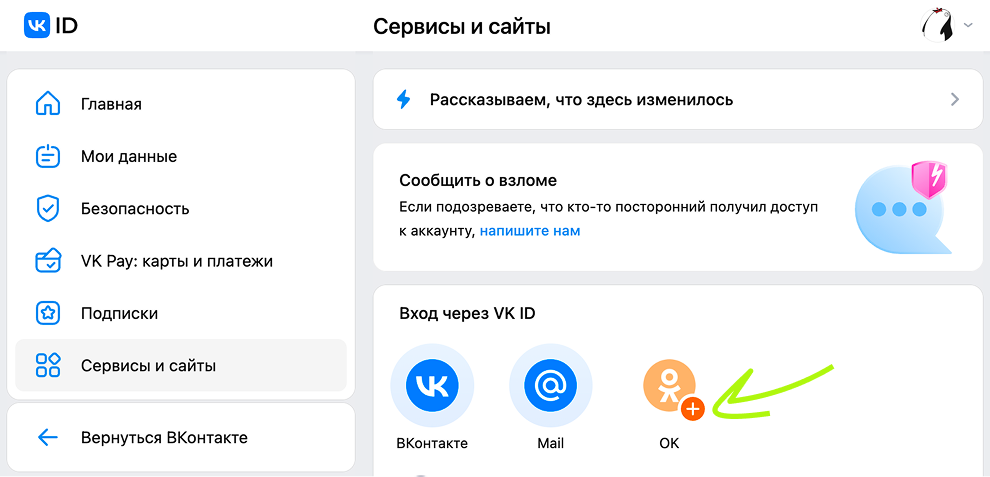 Services and Sites VK ID
 - 5.
Once the accounts are linked, the administrator must accept the offer and obtain developer rights in Odnoklassniki. To do this, in the control panel on the widget on the right click Get .
 Get developer rights
 - 6.
A dialog box will appear on the screen with an agreement to grant you developer rights. Read the agreement and click Get developer rights .
Materials on the topic
- •
- •
- •

