The translation was generated automatically and may contain mistakes
Notifications to all users
Sending mass notifications to all active users is used to draw attention to an event or campaign in a mini-app.
Mass notification settings are only available for VKontakte games..
Restrictions
- •Mass notifications can be sent no more than 1 time in 3 months.
- •At the same time, no more than 3 notifications can be used.
- •The duration of the mailing is no more than 14 days.
- •Mass notifications can be used in a mini-app only after it has passed moderation It was published in catalogue .
- •Creating Notifications state of the mini-application should be Included .
- •Users may receive notifications only after issuance of authorization .
How to implement
- 1.
Request the right to send notifications. More details in section Authorization of notifications .
- 2.
Go to the mini-app settings. Open it for that. list of Apps and press Settings in front of your game.
- 3.
In the settings, go to the section Mechanics and Notifications .
This section becomes available after the application is moderated and published in the directory.
- 4.
Go to the tab All users and unfold the event. Enter the notification text in the field.
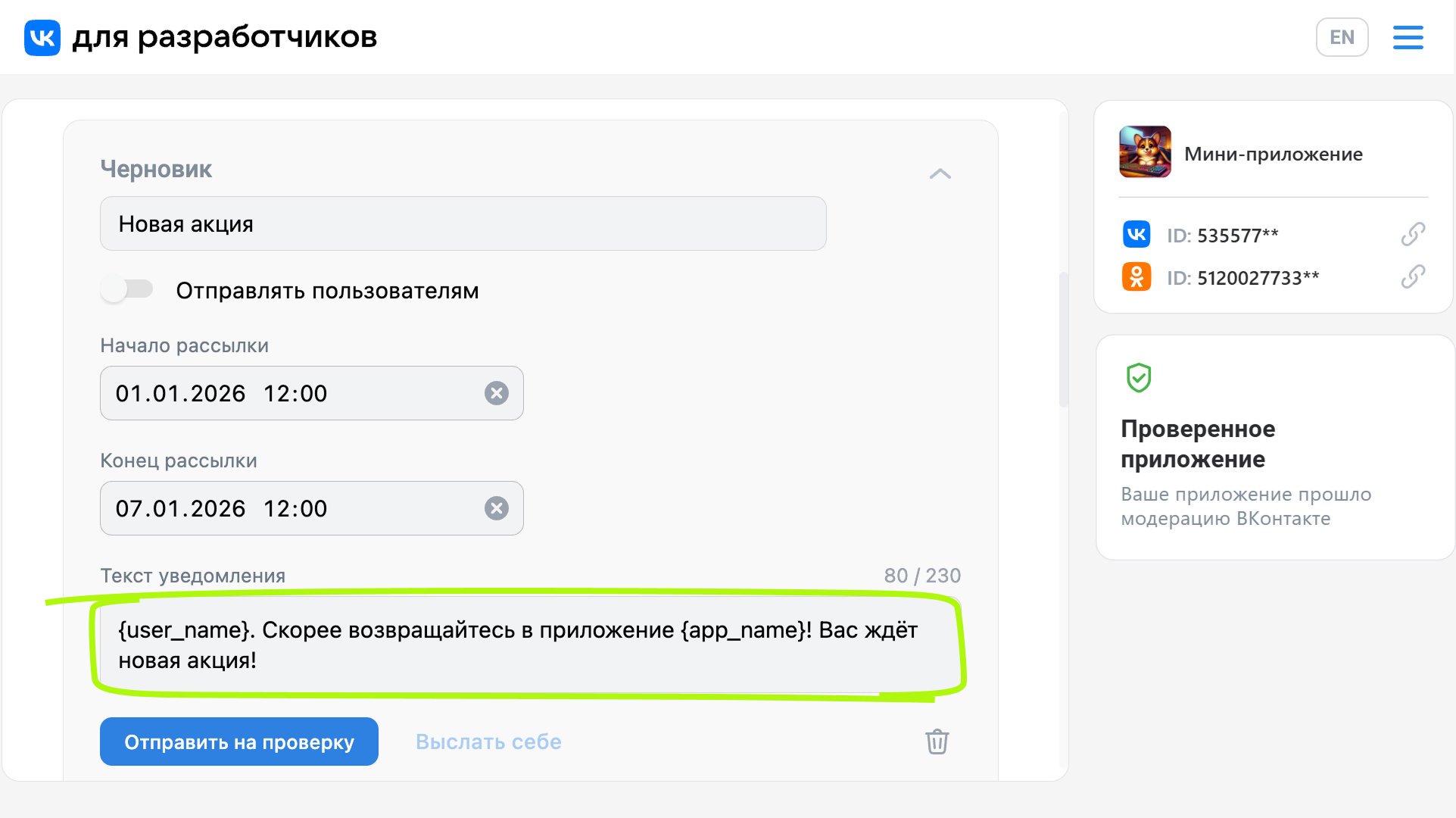 Editing the notification text
In the text of the notifications, the following expressions can be used to substitute values:
ExpressionWhat will be replaced{app_title}The name of the mini-app.{user_name}User name. - 5.
Indicate the mailing name, as well as the date and time of the beginning and end of the mailing.
Notifications are not sent to everyone at the same time. The user receives a notification when the VKontakte arrives.. Therefore, in the mailing settings, you must specify the date and time of the start and end of the mailing.
- 6.
Press the button Send it to yourself to see what the user’s notification would look like.
- 7.
If the message is ready, press the button.. Send it for inspection . The message will go to check.
Before you send a message to moderation, make sure it:
- •
It does not contain grammatical, spelling and punctuation errors.
- •
Does not mislead the user: the text of the message fully reflects the essence of the event taking place in the game.
Important! Verification takes time. We recommend sending moderation messages 7 business days prior to the intended launch.
- •
Once approved by the moderators, notifications will begin to leave users automatically.
To stop sending notifications, turn off Send to Users In the right mailing.
Materials on the topic
- •
- •
- •
- •
- •

