The translation was generated automatically and may contain mistakes
User-generated content and templates
Messages with User Content
When sending messages containing user content, it is necessary to transmit its source. It can be a photo from an album, a recording, a comment, a message.
The presence of a source will avoid blocking if users send prohibited messages.. rules of the Platform content, and may be useful to bots that forward user-generated content.
Information about the source of the content should be transmitted in the method messages.send in the parameter content_source .
Parameter content_source
In the parameter content_source An object describing the source of user-generated content for chatbots is transmitted.
If the source is another message, such as a message from a user to a bot:
{
  "type": "message",
  "owner_id": 0,
  "peer_id": 0,
  "conversation_message_id": 0
}- •
owner_idOn whose behalf it is statedpeer_idFor example, you can use content from a message from another group. - •
peer_idIdentifier of dialogue. - •
conversation_message_idThe message ID in the conversation. Do not confuse withmessage.idprofile.
If the source is any other content on the platform, such as a comment, post, photo:
{
  "type": "url",
  "url": "https://vk.ru/…"
}
Message Templates
Bots can send special messages using templates. Such messages differ from the usual ones both in appearance and functionality. At the moment, one template is supported - carousel.
Carousel
This is a message template that contains multiple elements. The elements of the carousel can be cut horizontally.
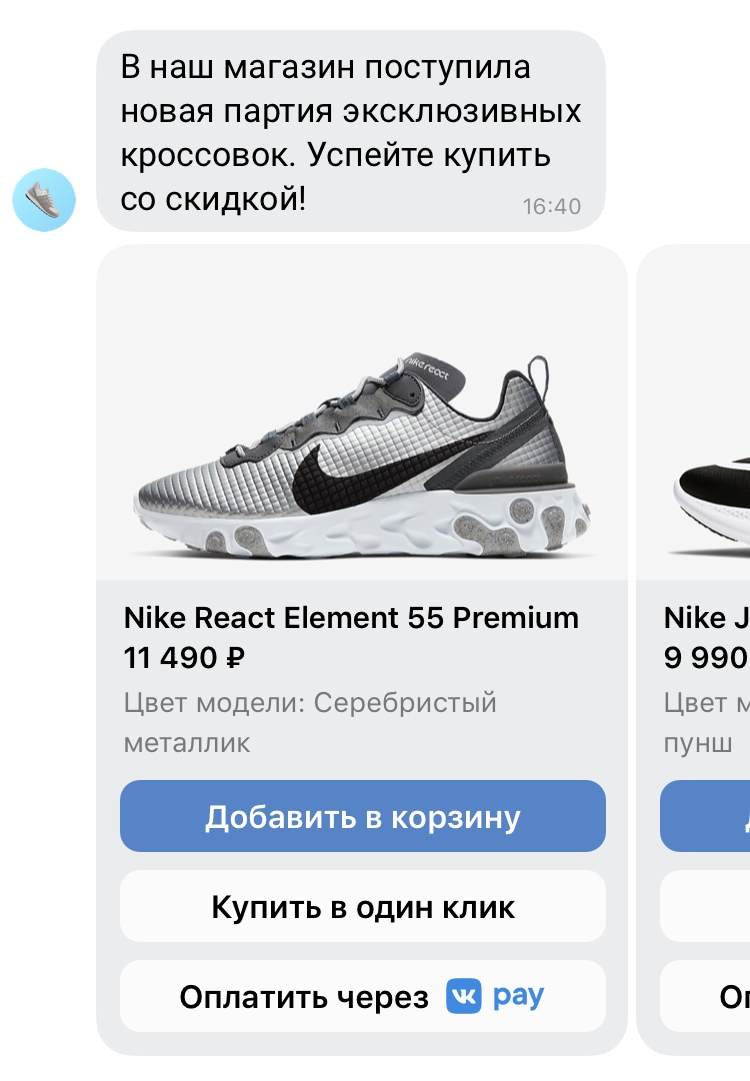 Carousel in the message
The carousel element can consist of a header, subtitle, pictures and buttons. Clicking on each of the elements of the carousel can be accompanied by an action: for example, by clicking on the element of the carousel, you can open the link.
Structurally, all elements of the carousel should be the same, while the first element determines the structure of the others.
Sending a carousel
To send a message with a carousel on behalf of the bot, call the method messages.send by passing it to a parameter template object of the following type:
{
  "type": "carousel",
  "elements": [
    "element1",
    "element2",
    "element3"
  ]
}
The object of the carousel element must contain the following fields:
- •
buttons - •
photo_idortitle - •
descriptionIf it is indicatedtitle
The rest of the fields are optional.
Please note that the parameter message method messages.send obligatory for messages with carousel.
The maximum number of elements in the carousel — 10 The minimum — 1 .
Carousel Element Fields
- •
title(string) — header, maximum length of 80 characters. - •
description(string) — subtitle, maximum length of 80 characters. - •
photo_id(string) is the ID of the image to be attached.Requirements for the image:
- •Proportions: 13/8.
- •Minimum size: 221×136 px.
Images are loaded in the same way as uploading a photo .
- •
- •
buttons(array) is an array of buttons. You can pass any buttons that are described in the section Keyboard . One element of the carousel may contain no more than 3 buttons. - •
action(object) — an object describing the action when pressing on the carousel element. Two actions are supported:- •
open_linkOpen the link from the fieldlink. - •
open_photoOpen the photo of the current carousel element.
- •
Examples
Carousel element
{
  "title": "Title",
  "description": "Description",
  "action": {
    "type": "open_link",
    "link": "https://vk.ru"
  },
  "photo_id": "-109837093_457242809",
  "buttons": [
    {
      "action": {
        "type": "text",
        "label": "Label"
      }
    }
  ]
}
Indication of action
{"type": "open_link", "link": "https://vk.com"}
{"type": "open_photo"}
Object template
{
  "type": "carousel",
  "elements": [
    {
      "photo_id": "-109837093_457242811",
      "action": { "type": "open_photo" },
      "buttons": [
        {
          "action": {
            "type": "text",
            "label": "Текст кнопки 🌚",
            "payload": "{}"
          }
        }
      ]
    },
    {
      "photo_id": "-109837093_457242811",
      "action": { "type": "open_photo" },
      "buttons": [
        {
          "action": {
            "type": "text",
            "label": "Текст кнопки 2",
            "payload": "{}"
          }
        }
      ]
    },
    {
      "photo_id": "-109837093_457242811",
      "action": { "type": "open_photo" },
      "buttons": [
        {
          "action": {
            "type": "text",
            "label": "Текст кнопки 3",
            "payload": "{}"
          }
        }
      ]
    }
  ]
}
Backward Compatibility
Carousels may not be available to the user, for example, if he uses an old version of the VKontakte app.. When sending, it is better to check whether this functionality is available to the user. If not, send the information in a normal message.
More details in section Information about the functions available to the user .
Materials on the topic
- •
- •
- •
- •
- •

