The translation was generated automatically and may contain mistakes
Overview
A chatbot keyboard is a block with buttons that is displayed in the message interface and helps the user interact with the bot without entering text.
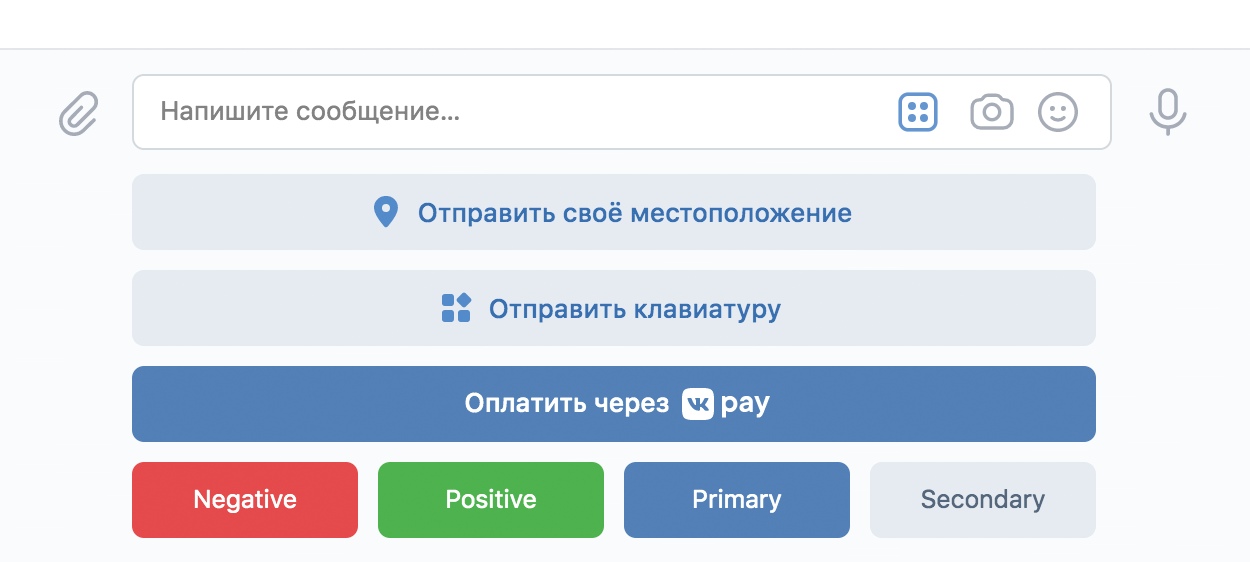 Keyboard example
Keyboard can be configured: number of buttons, signature, colors and actions. This allows you to build menus and scripts that depend on the context of the dialogue.
Types of keyboards
Field inline in object , which describes the keyboard, specifies the type of keyboard.
Chat Keyboard
If "inline": false , the keyboard is located under the text input field in the chat window.
Restrictions:
- •Up to 40 buttons.
- •Up to 10 rows of 5 buttons.
Inline keyboard
If "inline": true , the keyboard appears in the message field.
 Claim in the message
Restrictions:
- •Up to 10 buttons.
- •Up to 6 rows of 5 buttons.
General display rules
- •The height of all buttons is the same.
- •Buttons located in one line have the same width.
- •The width of each line is equal to the width of the keyboard.
- •The text is displayed in the center of the button and cropped if not placed in the boundaries of the button completely.
Keyboard Settings
The keyboard is passed in a parameter keyboard method messages.send as a JSON string.
Example:
{
  "inline": false,
  "one_time": false,
  "buttons": [
    [
      {
        "action": {
          "type": "text",
          "label": "Помощь",
          "payload": "{\"cmd\":\"help\"}"
        },
        "color": "secondary"
      }
    ]
  ]
}
Keyboard object
Field | Type | Description |
|---|---|---|
buttons Mandatory | array | An array of rows. Each row is an array of buttons. |
one_time | bool | Hide the keyboard after pressing ( true/false ). It works only when inline: false . |
inline | bool | Type of keyboard: false Under the field of entry, true within the message. |
The button object
Field | Type | Description |
|---|---|---|
action Mandatory | object | The action of the button. The types of actions are described in the section Types of buttons . |
color | string | The color of the button. Used only for buttons text and callback . |
Button colors
Importance | Appointment | Color in a light theme | Color in a Dark Theme |
|---|---|---|---|
primary | Main action | #5181B8 | #E1E3E6 |
secondary | The usual button | #E5EBF1 | #424242 |
negative | Cancellation/dangerous action | #E64646 | #FF5C5C |
positive | Confirmation | #4BB34B | #4BB34B |
Features of work
- •
To remove the keyboard from the chat, send an empty set of buttons in the parameter
keyboard:JSON{ "buttons": [] } - •
Check
payloadon the server. Meaningspayload, which are specified in the buttons, come in bot events. The user can substitutepayloadmanually, so check the incoming data and only process the allowed values. - •
If the “Start” button is enabled in the community settings, the user will send a command at the first dialogue
start.payloadIt will look like this:JSON{"command":"start"}
Materials on the topic
- •
- •
- •
- •

