The translation was generated automatically and may contain mistakes
How to connect
In VK Pay, the recipients of payments can be individual entrepreneurs (hereinafter - IP), legal entities and self-employed.
With VK Pay, they can accept payments, make refunds and cancellations of payments, learn about the status of transactions and receive financial notifications. All operations are executed via API requests to the Payment System .
The order of connection depends on the organizational and legal form:
- •
- •
For the self-employed
If you are registered with the IRS as self-employed, you can create a VKontakte community and receive money from users through community posts.
Accept payments on a VK Wallet or bank card that is specified in personal account of VK Pay . More information about transfer limits and commissions — in the description of money transfers VKontakte .
Step 1. Choose the community where you want to accept payments
To select a community from those already created, go to the section Community Management Choose the community.
To create a new community, in the section Communities Press on Creating a Community Follow the instructions on the screen.
Step 2. Check that all the conditions necessary for accepting payments are met
- •You have the rights of an owner, administrator or community editor.
- •You are registered as self-employed.
- •The type of your VK Wallet is extended. If you do not already have an extended VK Wallet connected, go through identification . More about the types of wallets in Rules for using the VK Pay service .
Step 3. Set up payments in the community
- 1.
Open the main page of your community, go to the section Business Tools → Payment and delivery Select the recipient and turn it on. Receiving payments through VK Pay .
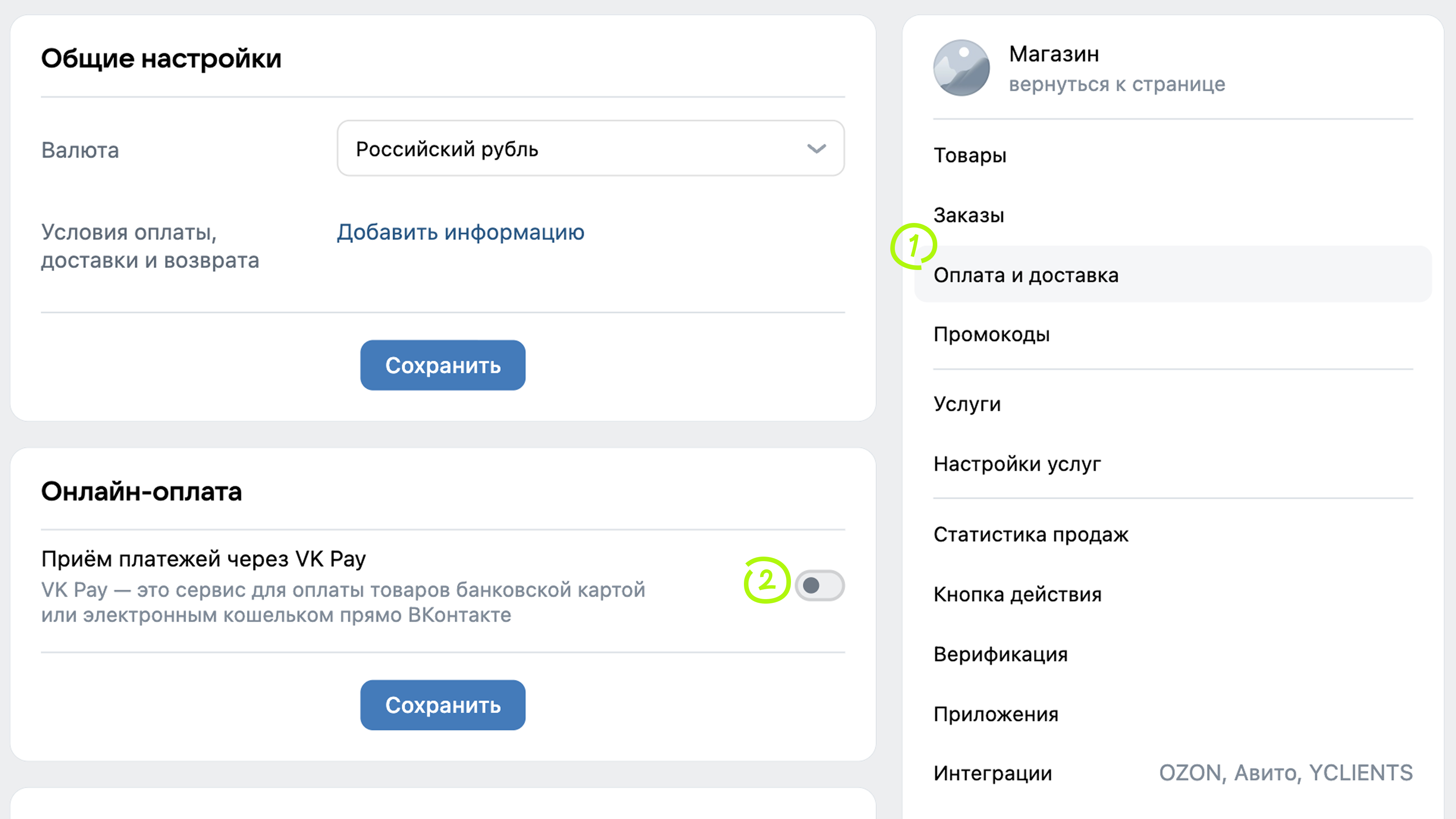 Connecting payments in the community
 - 2.
Turn to VK Business ID and VK Pay support and provide data that confirms your registration as self-employed:
- •TIN and date of birth.
- •Description of trading activities.
- •Link to the VKontakte community where you want to accept payments.
- •Certificate of registration in tax as self-employed.
- •
- 3.
Set up to receive payments. More about Payments — in Help VKontakte .
Done! You can now get paid via VK Pay.
To work with the payment system - to make cancellations and refunds of payments, to learn about the status of transactions, use API Requests .
For legal entities and individual entrepreneurs (IP)
If you are registered with the tax authority as an individual entrepreneur or a legal entity, you can create a VKontakte store and accept payment for goods and services to your current account or VK Pay account.
With VK Pay, you can also:
- •To connect the automatic formation and sending of checks when buying and returning goods through the operator of fiscal data — online cash register ATOL Online, version of the FED 1.05.
- •Check the payment history in your personal account.
- •Request and receive reports for a specific period.
- •Get it in your mail every day registers of successful payments and returns .
How to set up a store and set up payment via VK Pay
- 1.
- 2.
To accept payment for goods and services in your store through VK Pay, send an application : provide an email address for notifications and click on Save .
- 3.
The e-mail you provided will be linked to the questionnaire for connection. Follow the link to the VK Pay mini-app and fill out the questionnaire.
- 4.
The operator will check the data and send to the e-mail that you specified when submitting the application, an application for joining the offer and an agreed version of the questionnaire. Both documents must be signed and the scanned documents sent in a response letter.
- 5.
After signing the contract, technical support will give you credentials:
- •
merchant_id— a unique identifier of your store, which is needed to conduct operations in VK Pay. - •The public key of the seller.
- •Private key of the seller.
- •
- 6.
After the conclusion of the contract with the operator of VK Payment Solutions (JSC), you will immediately be able to accept payments. Further to pass identification You do not need to get an extended type of VK Wallet.
Payments for goods and services will be received on your current account daily, no later than 3 days from the date of payment of the goods (less the commission specified in the contract).
Read more about connecting IP and legal entities in the instructions Receiving payment for the store VKontakte .
Sending cheques
In accordance with Federal Law No. 54-FZ, when making settlements, the seller must send a cashier's check to the buyer and to the tax authorities.
VK Pay automatically forms and sends checks when buying and returning goods. Checks are formed through the operator of fiscal data — online cash register ATOL Online, version FED 1.05. Buyers receive online confirmation of payment through VK Pay.
If you do not have an online cash register, you can connect to ATOL Online. For this sign up for ATOL Online . There are VKontakte special connection conditions for users. Details on website of ATOL Online .
If you are already using ATOL Online:
- 1.
Copy the details of your cash register from the personal account of ATOL Online: login, password and group ID.
To do this, go to personal office of ATOL Online → My companies and press Integrator settings .
Wait for the file to be downloaded in XML format and open it. The file contains data to interact with the VK Pay service, you will need:- •
loginLogin to send data. - •
passwordPassword for sending data. - •
group_codeIdentifier of cash group. - •
hostnameThe URL of the box office.
Note that the parameter value must be copied without quotation marks.
If you have additional questions about how to obtain authorization data, contact ATOL support by email 1@atol.ru .
- •
- 2.
Indicate the received details in the section Business Tools → Payment and delivery → Checks for online payment .
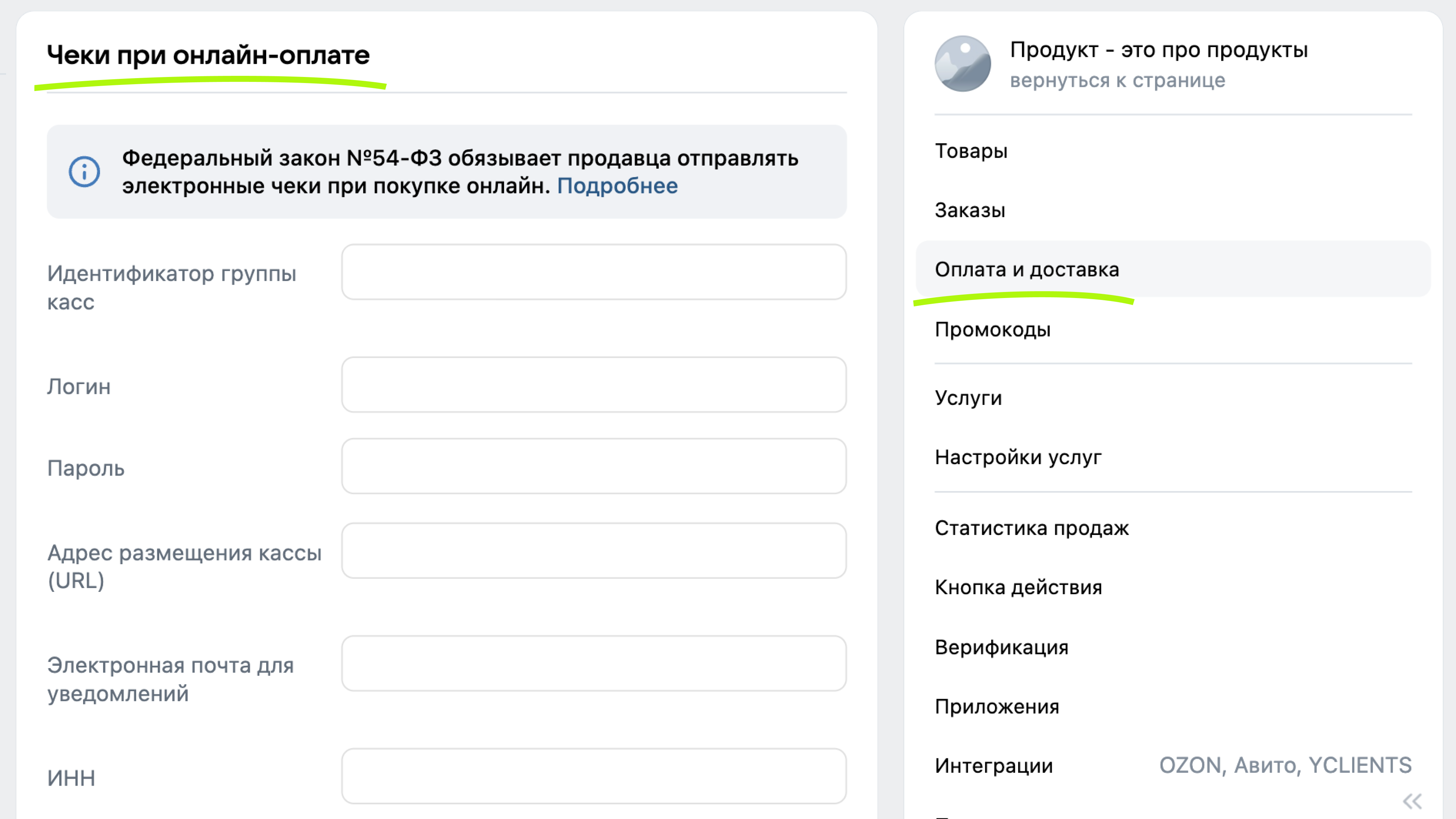 Setting of sending checks through the online ATOL cash register
Если вы используете другую онлайн-кассу, вам нужно самостоятельно настроить отправку чеков.

