Featuring games on OK
Recommended
"Recommended" is a block of banners at the top of the games catalog. It helps attract attention to a game and increase its number of launches. The game enters the "Recommended" block automatically or upon the developer's request once all placement requirements are met.
The banner is shown:
- •On the desktop website: as a video.
- •On mobile devices: as a static image.
On top of the banner is the name of the game, its short description and the Play button.
 Video in the desktop version of the game catalog
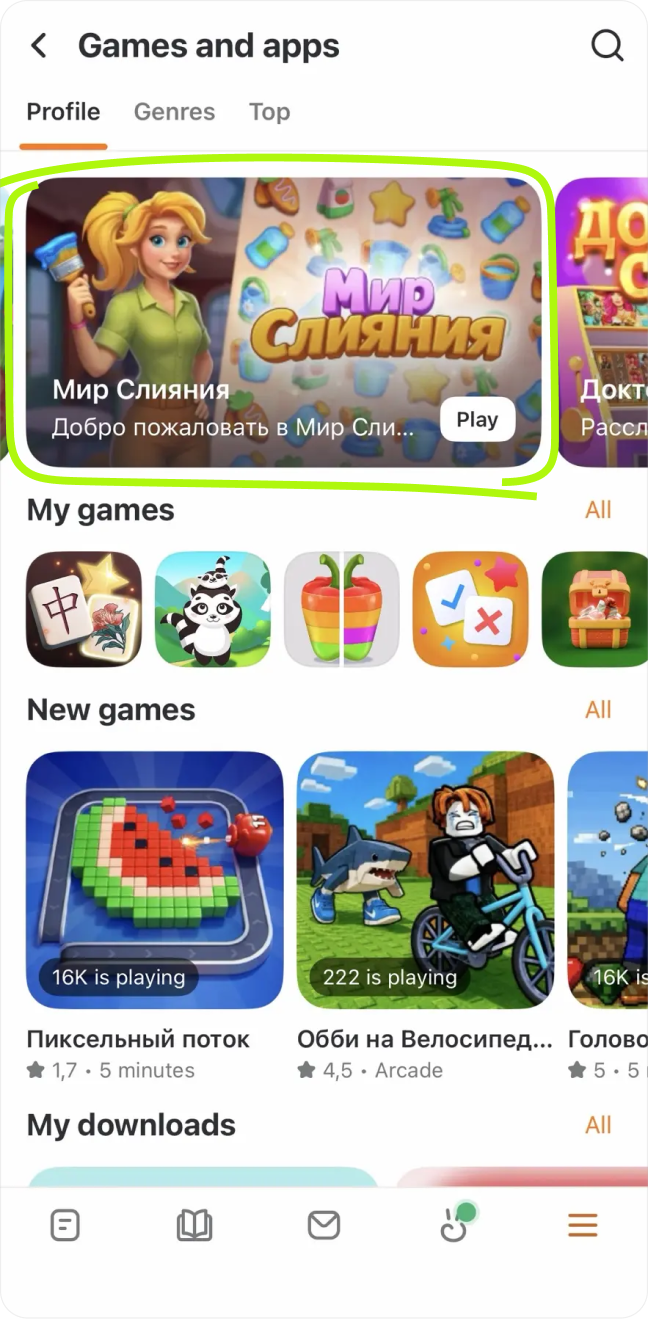 Banner in the game catalog on mobile devices
Automatic placement
The list is formed every Monday.
Requirements for automatic placement:
- •We select 10 games with the highest scores:
- •In the percentage of users returning to the game on the 14th day after the first launch.
- •In the average total revenue per user for the first 14 days.
- •
- •We use the first 2 out of the last 4 weeks as a reporting period; e.g., we'll take the period from 18 January through 31 January for featuring on 14 February.
- •The gap before the next placement must be at least 7 days.
Placement upon request
You can also send a request for placement in "Recommended" on your own. For the request to be approved, the game must meet the following requirements:
- •
The game has been in the catalog for at least a month.
- •
First day retention rate: 15%.
- •
Seventh day retention rate: 7%.
- •
Number of monthly active users (MAU): at least 3,000.
- •
If the game features ad-based monetization, the number of ad impressions of any type should be at least 30 monthly impressions per user. More about ad-based monetization:
- •
- •
- •
If the game features in-game purchases, monthly ARPU per user should be at least 7 OK.
- •
Don't place the name, logo or any other critical elements of the game in the bottom part of the image for the banner, as system text may be displayed in collections on top of the banner and block these elements.
- •
No more than 4 games by a single creator per month are allowed for placement in the collection.
- •
The game can be placed in "Recommended" again at least 30 days after the first placement.
- •
Request for placement must be sent at least 7 days before the desired placement date, but no earlier than 3 weeks before the date.
- •
When applying for placement in "Recommended" after a game update, e.g. for holiday or season events, make sure to update the banners.
Placement period
The game will be featured in "Recommended" on any platform for 7 days.
Banners
To feature the game in collections, you'll need banners.
Video banner
- •Size: no less than 1280×720 px.
- •Aspect ratio: 16:9.
- •Duration: 15–30 seconds.
The video for the banner should be uploaded to a group on OK. In the request, you'll need to indicate the uploaded video ID and the group ID.
Static banner
- •Size: 1120×630 px.
- •Game name included.
- •Name, logo and other critical elements of the game aren't present in the bottom part of the image, as system text may be displayed in collections on top of the banner and block these elements.
- •No elements thaht look like buttons, e.g. Play.
To place ann image:
- 1.
Open the app list, find your game and click Settings.
- 2.
In the left-hand menu, select Settings → Design. Upload the image to the Large snippet field. For details, see Design (game settings).
If you created the game on ok.ru, go to its settings and upload the image to the Cover image field.
- •
Size: 1280×720 px.- •
Max file size: 1 MB.
"Offers and updates" section
This section of the catalog features games that have just been updated or offer some special deals for their users:
- •
In-game currency or bonus sales.
- •
Limited-time sales.
- •
Any kind of unique promotion available for a limited time.
Updates are major changes in gameplay, such as adding a new game world or a significant rework of the bonus system.
The section is shown on all platforms.
"Offers and updates" section
For the game to be featured in the section, the developer should send a request for "Offers and updates". Placement requirements:
- •
The promotion must be at least 3 days long and have an end period.
- •
Maximum placement duration of a game in the section is 7 days.
- •
The gap before the next placement must be at least 7 days.
- •
The request indicates the exact period of the promotion and/or briefly explains what the update is about.
Add screenshots of screens informing users of the promotion or update to help the moderator make the decision faster.
- •
Requests for placement in the collection must be sent at least 2 business days in advance, but no earlier than 3 weeks before the desired placement date.
The "New" section
All games added to the OK section make it to the "New" section. No request required.
The game will feature a New badge that will remain for 7 days.
How to send a featuring request
To have your game featured, send a request to VK moderators. For details, see How to apply.
If your game was created on ok.ru, create a task of the corresponding type on jira.apiok.ru to apply for featuring.
See also
- •
- •

