The translation was generated automatically and may contain mistakes
Videos
The “Video” widget may not work in Firefox and Safari browsers due to the blockers enabled. For stable operation, disable tracking protection in the browser settings.
With this widget, you can add to your website a video uploaded to the VKontakte platform, for example, a commercial, a portfolio or an interview with customers.
The video will be built into the site in the form of a full-fledged VKontakte player.. The video can be viewed, put a mark “Like” and share it with friends.
To embed the video on the site, you need to copy and paste the widget code.
Connecting Widget
- 1.
Download the video to the VKontakte platform..
- 2.
Open the video in the player and press the button Export .
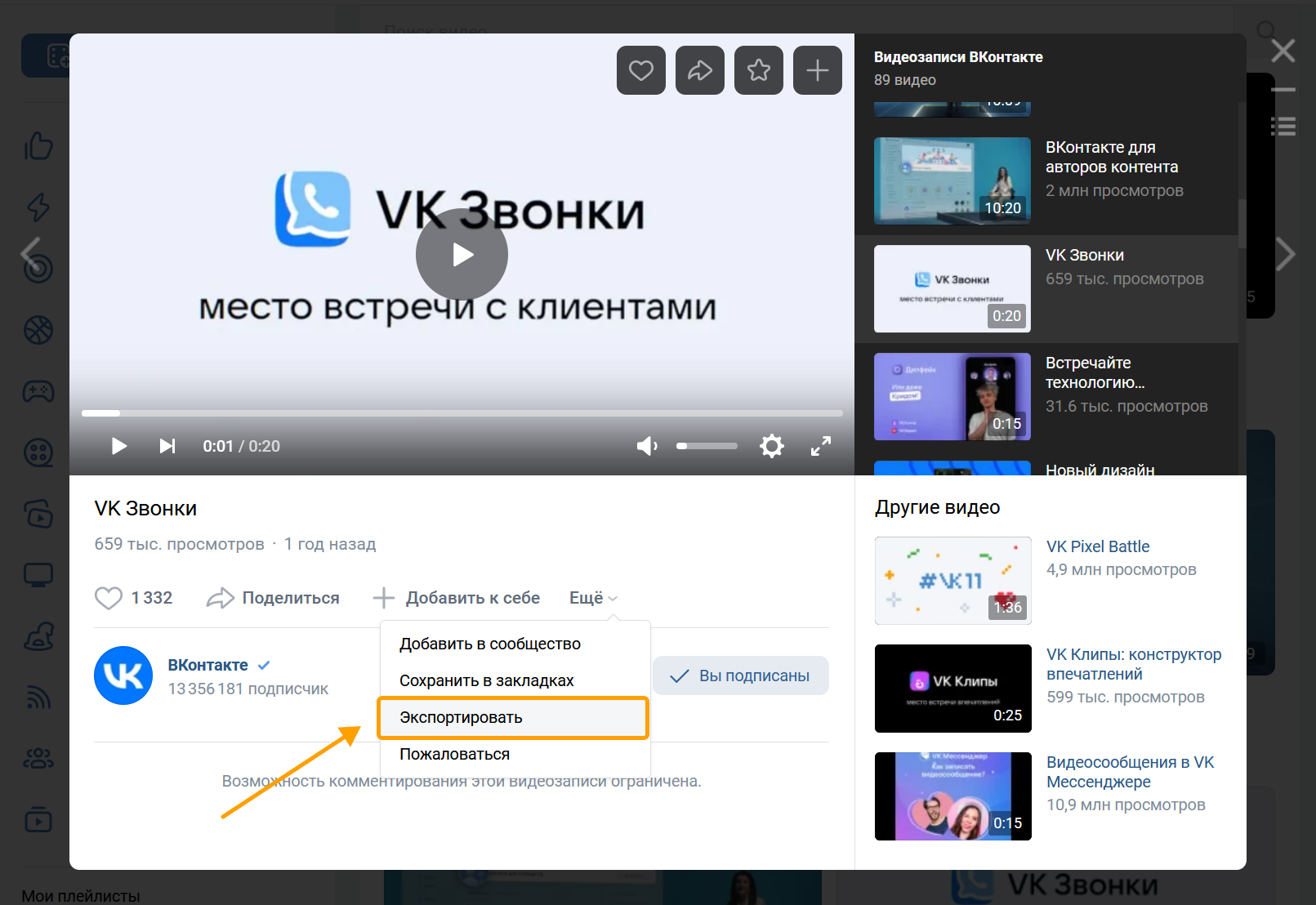 Video player VKontakte
 - 3.
Copy the video code in the window that appears.
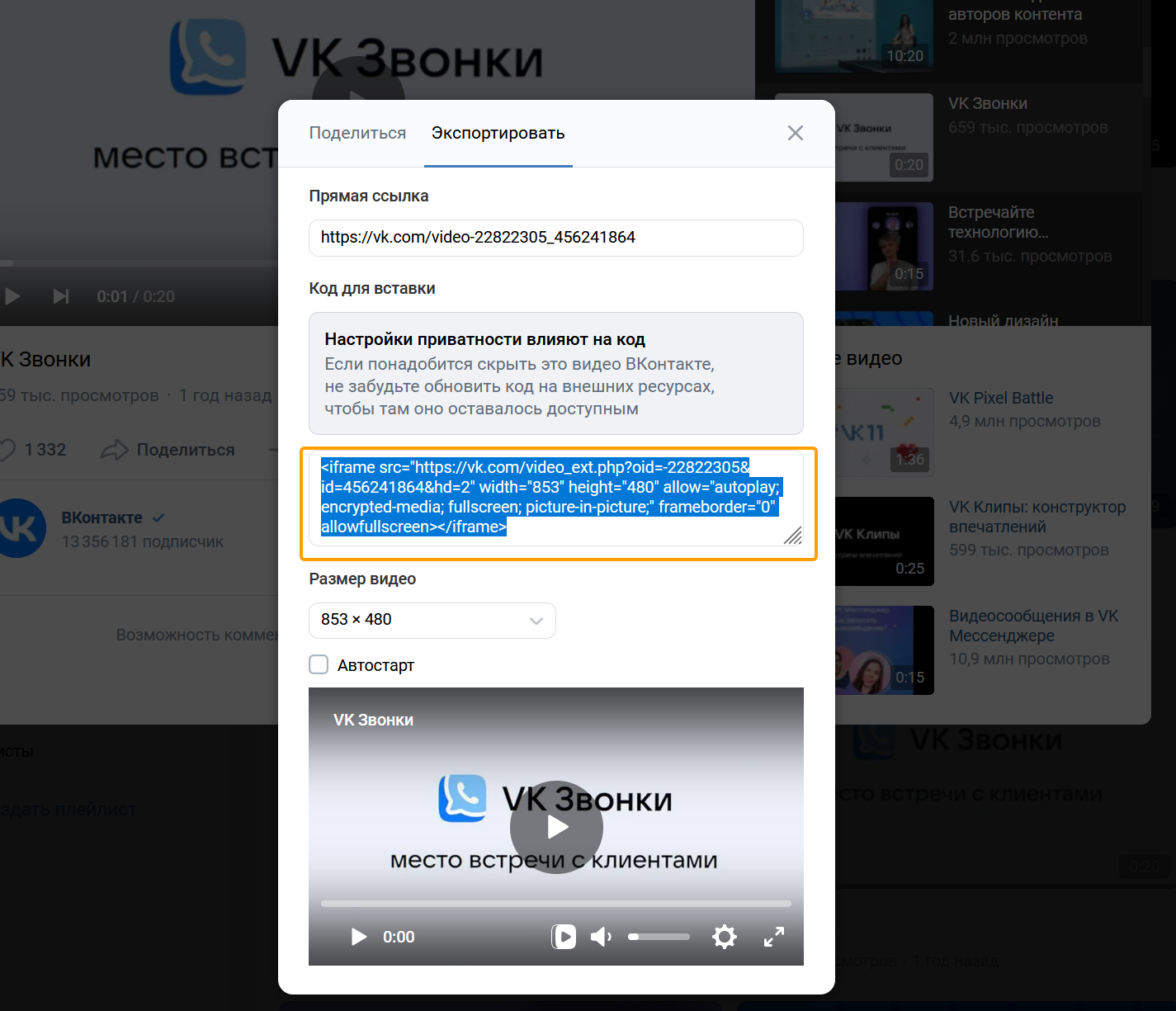 Video player VKontakte
 - 4.
Insert the code on the website page. Example code:
HTML<iframe src="https://vk.ru/video_ext.php?oid=-22822305&id=456241864&hd=2" width="853" height="480" allow="autoplay; encrypted-media; fullscreen; picture-in-picture;" frameborder="0" allowfullscreen></iframe>
In the video source, you can specify the following parameters:
Parameter | Description |
|---|---|
oid | The ID of the video owner: the user or community. The community ID is indicated with a minus sign - . |
id | Video ID. |
hash | The access key is issued when exporting. |
hd | Video resolution. Possible values:
• 1 — 640 x 360.
• 2 — 853 x 480.
• 3 — 1280 x 720.
• 4 — 1920 x 1080. |
t | The time stamp from which the video will be played. It is specified in the format 00h00m00s, where h is the clock, m is the minutes, s is the seconds. |
autoplay | Turn on automatic playback after downloading the video. Possible values:
• 1 - turn it on.
• 0 Or not specified - not included. |
loop | Replay the video. |
js_api | Use the JavaScript API to manage the widget. |
Widget management
You can control the widget from the JavaScript code on your page: control the video player and track the playback status by signing up for events.
Connectivity
- 1.
Connect the script:
HTML<script src="https://vk.ru/js/api/videoplayer.js"> - 2.
Add a parameter to the video address in the code of the copied widget
&js_api=1.HTML<iframe src="https://vk.ru/video_ext.php?oid=-22822305&id=456241864&hd=2&js_api=1" width="853" height="480" allow="autoplay; encrypted-media; fullscreen; picture-in-picture;" frameborder="0" allowfullscreen ></iframe> - 3.
Create a video player instance:
JavaScriptconst player = VK.VideoPlayer(iframe);
Methods
Method | Description |
|---|---|
play() | Starts or resumes video playback. |
pause() | Suspends video playback. |
seek(time:Number) | Moves playback to position time (in seconds). |
seekLive() | Moves the playback to the current state of the live broadcast. |
setVolume(volume:Number) | Sets the volume. It takes the value as a floating point number from 0 before 1 . |
getVolume() | Returns the volume value in the range of 0 before 1 . The return type is a floating point number. |
getCurrentTime() | Returns the current video time in seconds. The return value is an integer. |
getDuration() | Returns the video duration in seconds. The return value is an integer. |
getQuality() | Returns the value of video playback quality. |
mute() | Turn off the sound, does not affect the volume setting. |
unmute() | He turns on the sound. |
isMuted() | Returns true if the sound is turned off, otherwise false . |
getState() | Returns a string containing the player state value. Possible values:
• uninited - the iframe from the video did not load and the player was not initialized.
• unstarted Video playback has not started.
• playing The video is reproduced.
• paused Reproduction is suspended.
• ended Video playback is complete.
• error - Video playback error |
on(event:String, listener:Function) | Set event handler event . List of events below . |
off(event:String, listener:Function) | Remove event handler event . |
destroy() | Disables the player from all events and disables the API, but does not remove the iframe. |
Events
Using the method on(event:String, listener:Function) You can subscribe to the following events:
Event | Description |
|---|---|
inited | The iframe from the video loaded and the player was initialized. |
timeupdate | Update the current time of the video. |
volumechange | Updating the volume level or turning the sound on and off. |
qualitychange | Change the quality of the video being played. |
started | Start of video playback. |
resumed | Restart playback after a pause. |
paused | Pause playback. |
ended | Completion of Reproduction. |
error | Reproduction error. |
adStarted | The beginning of a commercial. |
adCompleted | The end of the advertising section. |
The list of available player event values is available in the code via the object VK.VideoPlayer.Events .
Object state
Processors of all events Return the object state with the following fields:
Field | Type | Description |
|---|---|---|
state | string | The condition of the player. Possible values:
• uninited - the iframe from the video did not load and the player was not initialized.
• unstarted Video playback has not started.
• playing The video is reproduced.
• paused Reproduction is suspended.
• ended Video playback is complete.
• error Error playing the video. |
volume | number | Current playback volume as a floating point number in the range of 0 before 1 . |
muted | boolean | true if the sound is turned off, and false if it’s on. |
time | number | Current playback position in seconds. |
duration | number | Length of video in seconds. |
Example object state :
{
    "state": "playing",
    "volume": 0.7,
    "muted": "false",
    "time": 321,
    "duration": 600
}
The list of available player values is available in the code via the object VK.VideoPlayer.States .
Widget code
To add a widget to your site, copy the code to paste to the page you want to place the widget on.

