The translation was generated automatically and may contain mistakes
Interaction scenario
This article describes how your iOS app interacts with iOS’s VK ID Captcha SDK and API VKontakte for the case of auto-handling a captcha error from API VKontakte and displaying a captcha screen with method handleCaptcha() .
How to install and connect VK ID Captcha SDK iOS, see in instructions .
Interaction scheme
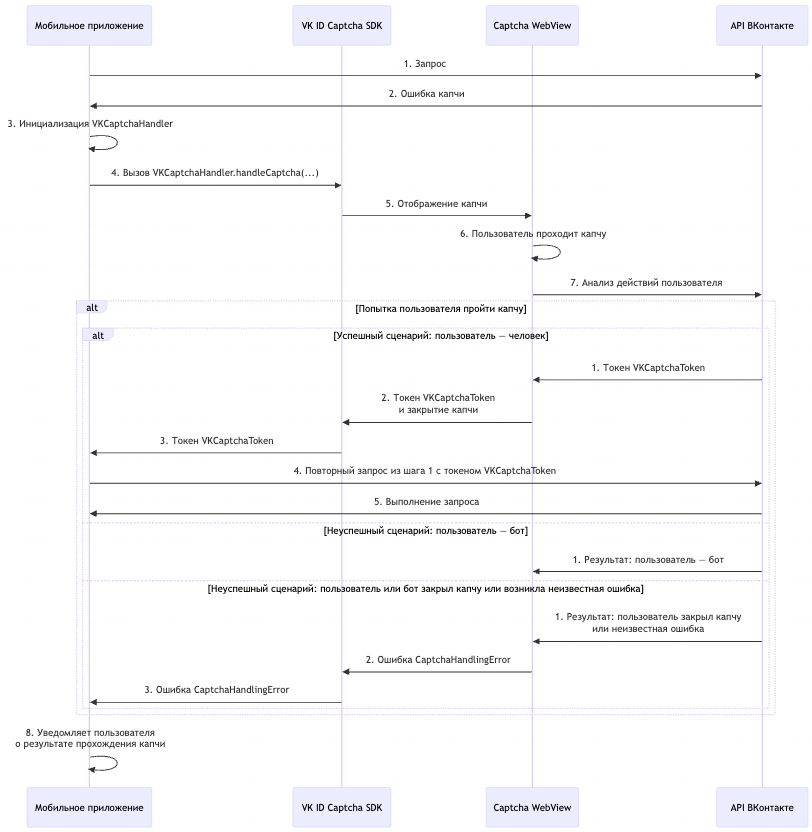 Interaction scheme with VK ID Captcha SDK iOS
Order of interaction
- 1.Your app sends a request to the API VKontakte>
- 2.
- 3.API VKontakte returns a captcha error to the mobile app.
- 4.Mobile App Initializes the Class
VKCaptchaHandler. - 5.The mobile application sends a request to the VK ID Captcha SDK iOS for processing the response from the server by the method
VKCaptchaHandler.handleCaptcha(). - 6.VK ID Captcha SDK iOS sends a captcha display request to Captcha WebView.
- 7.The user passes the captcha.
- 8.API VKontakte analyzes the user's actions. Depending on the result, options are possible:
- •Successful scenario: the user is a human, passed the captcha.
- 1.API VKontakte creates a captcha success token
VKCaptchaTokenand passes it to Captcha WebView. - 2.Captcha WebView transmits
VKCaptchaTokenVK ID Captcha SDK iOS and closes the captcha window. - 3.VK ID Captcha SDK iOS transmits
VKCaptchaTokenin the mobile application. - 4.The mobile app sends an API VKontakte a re-request, in response to which the captcha error returned (step 2). In the request, you need to pass the received token of successful captcha passing
VKCaptchaToken. Depending on the captcha type, you need to specify a token in the header or in the query parameters. - 5.API VKontakte executes the request.
- 1.
- •Unsuccessful scenario: the user is a bot.
- 1.API VKontakte returns an error to Captcha WebView.
- 2.The captcha can be re-run after a request is sent (step 1). The user can go through the captcha again or contact technical support.
- 1.
- •Unsuccessful scenario: the user or bot closed the captcha window or an unknown error occurred.
- 1.API VKontakte returns an error to Captcha WebView.
- 2.Captcha WebView returns an error in the iOS Captcha SDK VK ID
CaptchaHandlingError. - 3.Captcha SDK iOS returns an error to the mobile application
CaptchaHandlingError.
- 1.
- •
- 9.The mobile application displays the user the result of passing the captcha.

