The translation was generated automatically and may contain mistakes
Interaction script for manual captcha processing
Below are the interaction scenarios between a mobile application on the Android platform and a VK ID Captcha SDK IF you are using handling with listener interfaces .
The processing depends on the type of error that came from the API VKontakte>
- •
- •
How to install and connect VK ID Captcha SDK Android, see in instructions .
More about methods and interfaces in vK ID SDK Android .
Error handling with code 14
If a user in a mobile app calls an event too often, API VKontakte can return it to your mobile app captcha Error with code "error_code": 14 , the message "error_msg": "Captcha needed" and a reference to initialize the captcha session in the field redirect_uri .
Interaction scheme
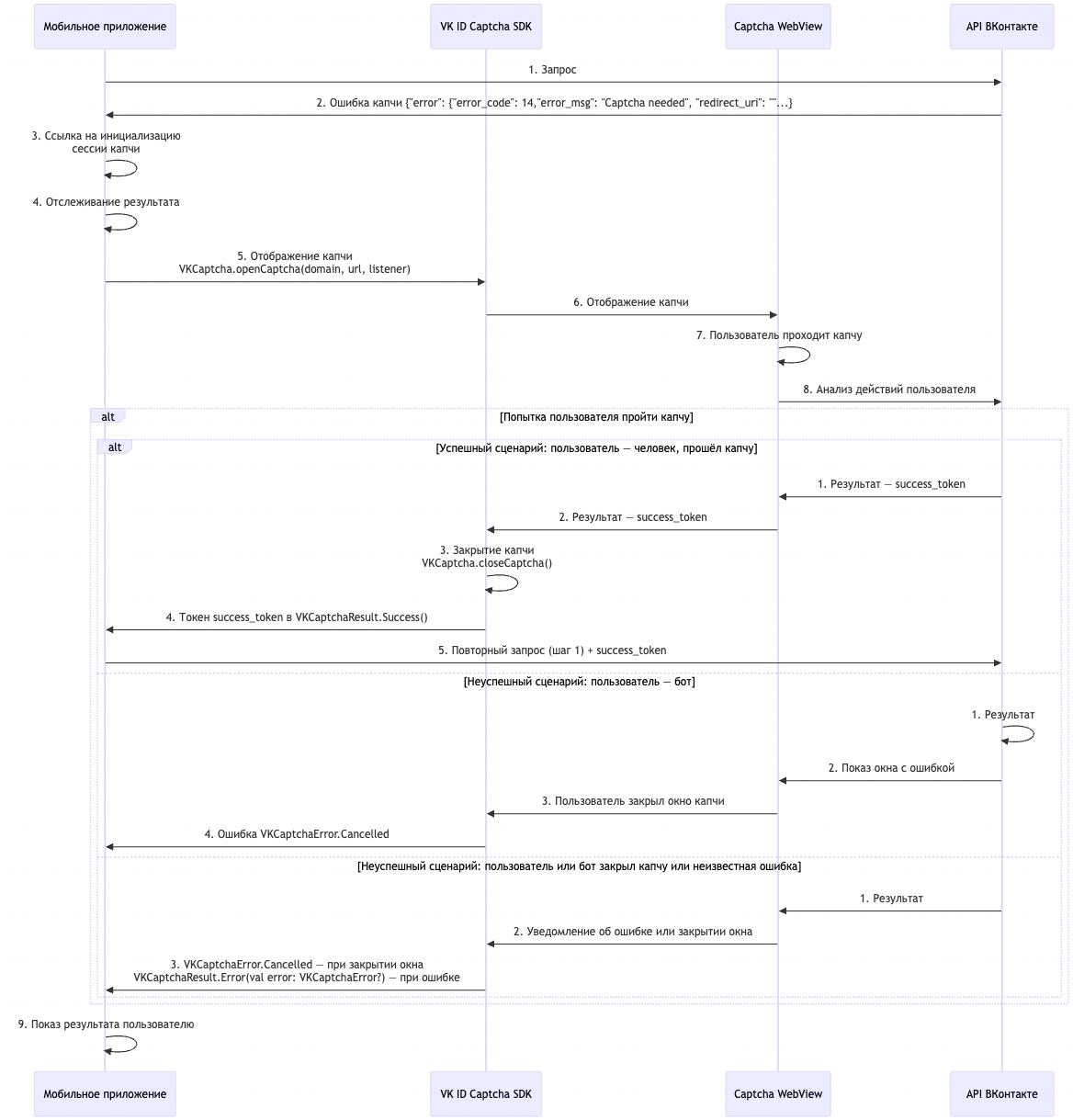 Interaction scheme with VK ID Captcha SDK Android when handling error with code 14
Order of interaction
- 1.The mobile app sends a request to the API VKontakte>
- 2.
- 3.API VKontakte returns a captcha error with the code to the mobile app
"error_code": 14, the message"error_msg": "Captcha needed"and a reference to initialize the captcha session in the fieldredirect_uri. - 4.Mobile application receives from the field
redirect_uriA reference to the initialization of a captcha session. - 5.The mobile application begins to track the result of passing the captcha using the interface
VKCaptchaResultListener. - 6.The mobile application sends a request to the VK ID Captcha SDK Android to display the captcha method VKCaptcha.openCaptcha(domain, redirectUri, listener) .
- 7.VK ID Captcha SDK Android sends a captcha display request to Captcha WebView.
- 8.The user passes the captcha.
- 9.API VKontakte analyzes the user's actions. Depending on the result, options are possible:
- •Successful scenario: the user is a human, passed the captcha.
- 1.API VKontakte creates a captcha success token
success_tokenand passes it to Captcha WebView. - 2.Captcha WebView transmits
success_tokenin VK ID Captcha SDK Android. - 3.VK ID Captcha SDK Android closes captcha window with method
VKCaptcha.closeCaptcha(). - 4.VK ID Captcha SDK Android transmits
success_tokenIn the eventonResult()in the listener interfaceVKCaptchaResultListener, returningVKCaptchaResult.Success(val token: String). - 5.The mobile app sends an API VKontakte a re-request, to which the captcha error returned (step 1), with the captcha success token
success_token. - 6.API VKontakte executes the request.
- 1.
- •Unsuccessful scenario: the user is a bot.
- 1.API VKontakte returns an error to Captcha WebView.
- 2.Captcha WebView displays a screen of unsuccessful captcha passing.
- 3.The user closes the captcha window.
- 4.VK ID Captcha SDK Android returns event to mobile app
VKCaptchaError.Cancelledin the listener interfaceVKCaptchaResultListener. The user can go through the captcha again or contact Support.
- 1.
- •Unsuccessful scenario: the user or bot closed the captcha window.
- 1.API VKontakte returns an error to Captcha WebView.
- 2.Captcha WebView notifies the VK ID of Captcha SDK Android about the window closing.
- 3.VK ID Captcha SDK Android returns event to mobile app
VKCaptchaError.Cancelledin the listener interfaceVKCaptchaResultListener.
- 1.
- •Unsuccessful scenario: a mistake.
- 1.API VKontakte returns the result to Captcha WebView.
- 2.Captcha WebView notifies the VK ID Captcha SDK of the error.
- 3.VK ID Captcha SDK Android returns an error
VKCaptchaResult.Error(val error: VKCaptchaError?)in the listener interfaceVKCaptchaResultListener.
- 1.
- •
- 10.The mobile application displays the user the result of passing the captcha.
Handling Headers X-Challenge ?1? X-Challenge-Url
In response to your request, the API VKontakte can return headers to your mobile app X-Challenge ?1? X-Challenge-Url .
Interaction scheme
 Interaction scheme with VK ID Captcha SDK Android when processing headings "X-Challenge" and "X-Challenge-Url"
Order of interaction
- 1.The mobile app sends a request to the API VKontakte>
- 2.
- 3.API VKontakte returns headers to the mobile app
X-Challenge?1?X-Challenge-Url: /challenge.html. - 4.The mobile application begins to track the result of passing the captcha using the interface
VKCaptchaResultListener. - 5.The mobile application sends a request to the VK ID Captcha SDK Android method
VKCaptcha.getToken()To obtain a token with a domain name. - 6.VK ID Captcha SDK checks for a token for the transferred domain. The following scenario depends on the token:
- •There is already a token for this domain
- 1.VK ID Captcha SDK Android transfers the token to your mobile app.
- 2.Mobile App Adds Received Token to Header
X-Challenge-Solution. - 3.The mobile app sends an API VKontakte a re-request, to which the error returned (step 1), with a captcha pass token.
- 4.API VKontakte executes the request.
- 1.
- •There is no token for this domain yet
- 1.VK ID Captcha SDK Android returns a blank value to the mobile app.
- 2.The mobile application sends a request to the VK ID Captcha SDK Android to display the captcha method
VKCaptcha.openCaptcha(domain, challengeUrl, listener). The method passes a listener interfaceVKChallengeResultListener. - 3.VK ID Captcha SDK Android opens Captcha WebView c URL received from the mobile application.
- 4.The user passes the captcha.
- 5.API VKontakte analyzes the user's actions. Depending on the result, options are possible:
- •Successful scenario: the user is a human, passed the captcha.
- 1.API VKontakte creates a captcha success token
success_tokenand passes it to Captcha WebView. - 2.Captcha WebView transmits
success_tokenin VK ID Captcha SDK Android. - 3.VK ID Captcha SDK Android closes captcha window with method
VKCaptcha.closeCaptcha(). - 4.VK ID Captcha SDK Android transmits
success_tokenIn the eventVKCaptchaResult.Success(val token: success_token)in the listener interfaceVKCaptchaResultListener. - 5.Mobile App Adds Token to Header
X-Challenge-Solution: <значение_токена>. - 6.The mobile app sends an API VKontakte a re-request, to which the captcha error returned (step 1), with the captcha success token
success_token. - 7.API VKontakte executes the request.
- 1.
- •Unsuccessful scenario: the user is a bot.
- 1.API VKontakte returns an error to Captcha WebView.
- 2.Captcha WebView displays a screen of unsuccessful captcha passing. The user closes the captcha window.
- 3.VK ID Captcha SDK Android returns event to mobile app
VKCaptchaError.Cancelledin the listener interfaceVKCaptchaResultListener. The user can go through the captcha again or contact Support.
- 1.
- •Unsuccessful scenario: the user or bot closed the captcha window.
- 1.API VKontakte returns the result to Captcha WebView.
- 2.Captcha WebView notifies the VK ID of Captcha SDK Android about the window closing.
- 3.VK ID Captcha SDK Android returns event to mobile app
VKCaptchaError.Cancelledin the listener interfaceVKCaptchaResultListener.
- 1.
- •Unsuccessful scenario: a mistake.
- 1.API VKontakte returns the result to Captcha WebView.
- 2.Captcha WebView notifies the VK ID Captcha SDK of the error.
- 3.VK ID Captcha SDK Android returns an error
VKCaptchaResult.Error(val error: VKCaptchaError?)in the listener interfaceVKCaptchaResultListener.
- 1.
- •
- 1.
- •
- 7.The mobile application displays the user the result of passing the captcha.

