The translation was generated automatically and may contain mistakes
Payment window for developers
From the developer’s point of view, the payment form is a URL with the seller’s parameters and mini-applications . Your task is to correctly form this URL with events VK Bridge for VK Mini Apps and track the result of user actions, linking it to the business logic of the store.
Supported Platforms
Android, Mobile Web, Web
Interaction scenario with the payment window
Participants:
- •User — an individual who pays for your services or goods through the payment window.
- •Mini-app A web application that runs from the VKontakte user interface.
- •VK Bridge A library that allows applications to use the VKontakte API and the operating system API that is installed on the user's device.
- •API VKontakte An interface that provides information from database of vk.com HTTP requests to a special server.
- •The VK Pay system — VK Payment Solutions LLC, an instant payment system that allows users to pay for services and goods through the payment window.
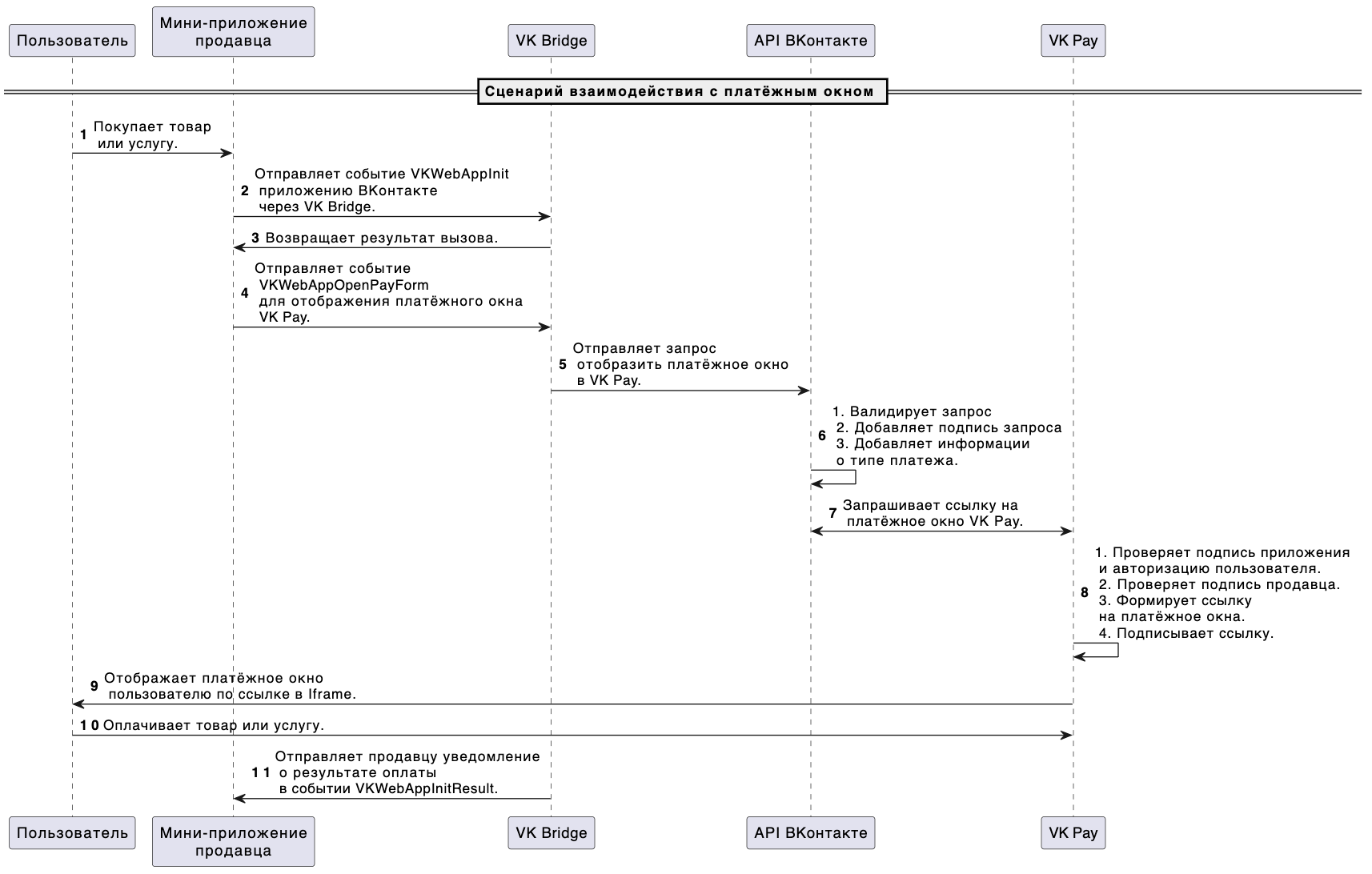 Interaction scenario with the payment window
Order of interaction:
- 1.The user decides to buy a product or service and clicks Pay up .
- 2.You're initialize your mini-application — send event
VKWebAppInitVKontakte through VK Bridge. - 3.In response to VK Bridge returns One of two events:
VKWebAppInitResult(the application is initialized) orVKWebAppInitFailed(Error when interacting with the platform). - 4.In case of successful initialization, the mini-app sends a VK Bridge event
VKWebAppOpenPayFormfor view the VK Pay window . - 5.VK Bridge sends a VKontakte request to display the payment window.
- 6.The VKontakte validates the request, adds the app’s signature and information about the type of payment.
- 7.VKontakte sends a request for a link to the payment window in VK Pay.
- 8.Payment system VK Pay checks the data of the wallet, user authorization, the signature of the application and the seller, forms a link to the payment window and signs it.
- 9.VK Pay displays the payment window to the user via a link in the iframe.
- 10.The user makes the payment.
- 11.VK Bridge sending an event Seller as a result of payment
VKWebAppOpenPayFormResult.

