The translation was generated automatically and may contain mistakes
Sale of Subscriptions
Selling subscriptions works the same way sale of goods but has features that are associated with the fact that the subscription involves periodic write-offs votes from the user account to the application account (games or mini-applications).
The VKontakte takes over the tracking of the period and periodic write-offs. Votes are debited from the user's account at the beginning of each period.
If you cannot renew your subscription, VKontakte will automatically cancel it. The user may also terminate the subscription on his own initiative. Cancelled subscriptions can be restored. More details in section Cancellation and renewal of subscriptions .
When you change your subscription status, VKontakte sends notifications to the server of your mini-app or game.
How to Sell Subscriptions
Step 1. Prepare the server side of the application
- 1.
On the application server, define a URL that will be used to receive notifications from the VKontakte> Use the same URL which you use to receive notifications about the sale of goods.
- 2.
On the server side, process the following notifications:
NotificationDescriptionThe VKontakte sends this notification to get the subscription information to display in the purchase window: the subscription name, its cost, icon, validity period, duration of the trial period.This notice is used when purchasing, canceling and renewing a subscription. - 3.
Implement on the server verification of the registration of a subscription for a unique
order_idand order status:- •Subscribe to each
order_idOnly once. - •If you receive repeated notifications in which the status of the order is the same, and
order_idSubscription has already been issued, return the same successful answer as at the first registration.
This will help to avoid re-subscriptions.
- •
Step 2. Specify the callback address in the application settings
In the settings of your application, VKontakte need to specify the URL you selected, the version of notifications used, as well as users who will be able to make payments for notifications in test mode:
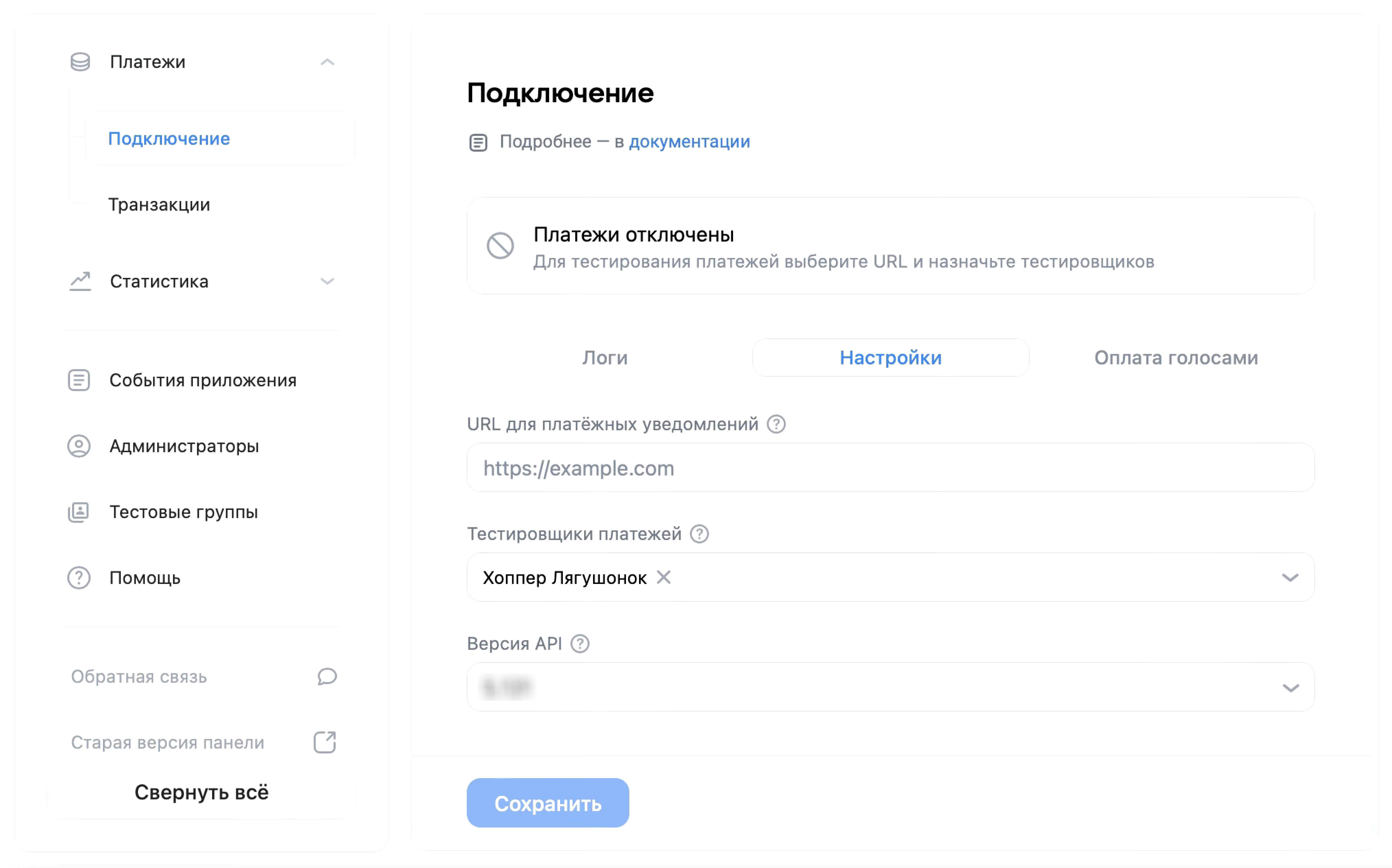 Payments section in application settings
Adding administrators to this list is mandatory for testing. Without this, payment testing is not available even to full-access administrators. More information about the test settings — in the section Testing of Payments .
Step 3. Call the VK Bridge event to show the purchase window
Use the event to call the subscription selling window on the user side VKWebAppShowSubscriptionBox VK Bridge libraries, for example:
bridge.send('VKWebAppShowSubscriptionBox', {
  action: 'create',
  item: 'sale_item_subscription_1', // Идентификатор подписки в приложении
  })
  .then( (data) => {
    console.log('Покупка прошла успешно', data);
  })
  .catch( (e) => {
    console.log('Ошибка!', e);
  })
Data exchange
After calling the event VKWebAppShowSubscriptionBox The following happens:
- 1.
The VK Bridge library sends a request to the VKontakte platform, which in turn sends a notification to the server of your application
get_subscription.In response to the notification, the server transmits the subscription information, which is then displayed in the purchase window.
- 2.
After the user confirms the payment in the purchase window, the platform sends a notification to the application server
subscription_status_change.When processing this notification, the server must provide the user with the benefits of the subscription and send a response about the successful completion of the operation. After receiving the response, VKontakte considers the subscription issued.
Important comments about working with subscriptions
- •
VKontakte only sends notifications when you sell, cancel, or renew a subscription.
Notices are not given for regular subscription renewals. In this case, VKontakte simply debits money from the user's account to your application account.
- •
To report a change in subscription status, the VKontakte sends a notification of the type
subscription_status_change. This notice is used to purchase, cancel, or renew a subscription. To determine a specific action, you need to analyze the parameterstatusThis notification:ParameterstatusDescriptionchargeableThe user paid for the subscription. When processing a notification, your application should provide the user with the benefits of a subscription.activeThe subscription is active. This notice comes some time afterchargeableas a confirmation that the VKontakte servers have received a response tochargeable-Notice. In addition, this notification comes when you cancel your subscription. In this case, the parametercancel_reasonThe notification indicates the reason for the cancellation. Cancelled subscription continues until the end of the paid period. At this time it can be resume .cancelledSubscription cancelled. After receiving this message, the subscription cannot be renewed. You can sell a new one. - •
To track a particular instance of a subscription, VKontakte automatically generates its ID. Your app’s server gets it when you sell a subscription in a notification
subscription_status_changein the parametersubscription_id.This identifier is subsequently used to cancel and renew a subscription. Save it to the application server so that it can provide the subscription instance information when VKontakte requests it.
- •
In case of re-notification
subscription_status_changewith the same parameter.subscription_id, the response of your server must repeat the response for the notification received earlier.For example, if your server sent a positive response to the notification, but this response did not reach the VKontakte servers, or if the VKontakte failed to transfer the user's votes to the application account immediately after receiving the response, then the VKontakte will send a notification
subscription_status_changeagain.At the same time, your application server should not execute a new order. It will be enough to send the same answer that was sent the previous time. To do this, you need to save a server-side parameter
subscription_idCheck that such notice has already been received.
How to check subscription status
Information about orders, payments and subscriptions is stored on the VKontakte servers.. To work with the list of purchased goods and subscriptions, you can use the group API operations Orders .
For subscription information, send an API request orders.getUserSubscriptionById .
Cancellation and renewal of subscriptions
Cancellation of the subscription is possible in the following cases:
- •
If at the next write-off on the user account there are not enough votes.
VKontakte user will first try to replenish the account with a bank card, e-wallet or VK Pay account associated with the user's VKontakte account.. The attached payment tool can be seen in the account settings, in the section Payment services .
If the number of votes cannot be replenished, the VKontakte will cancel the subscription.
If the user replenishes his account within 5 days, the VKontakte will restore the subscription automatically. In this case, the application server must renew the existing subscription..
subscription_idThere is no need to create a new subscription. - •
If the user cancels the subscription on their own initiative.
The user can do this in the settings of his account VKontakte in the section Payment services from your application, if it provides such an opportunity .
With such cancellation, there is no refund for the paid periods. Cancellation means that write-offs will not be carried out in the future.
Cancelled subscription remains active until the end of the paid period. It can be resumed at this time. You can do this in the account settings VKontakte in the section Payment services or from the application, if it provides such an opportunity .
How to cancel a subscription from the app
Use the event to cancel your subscription VKWebAppShowSubscriptionBox VK Bridge. In the parameter subscription_id Indicate the subscription ID that was generated by the VKontakte and that you received during the sale.
bridge.send('VKWebAppShowSubscriptionBox',
  {
    action: 'cancel',
    subscription_id: 25, // Идентификатор подписки, полученный от ?1?’Контакте
  })
  .then( (data) => {
    console.log('Отмена прошла успешно', data);
  })
  .catch( (e) => {
    console.log('Ошибка!', e);
  })
On the server side, use the notification handler to cancel subscription_status_change .
How to Restart a Subscription from the App
Cancelled subscriptions can be renewed. For this call VKWebAppShowSubscriptionBox Use the following parameters:
bridge.send('VKWebAppShowSubscriptionBox',
  {
    action: 'resume',
    subscription_id: '25', // Идентификатор подписки, полученный от ?1?’Контакте
  })
  .then( (data) => {
    console.log('Подписка восстановлена.', data);
  })
  .catch( (e) => {
    console.log('Ошибка!', e);
  });
On the server side, use the notification handler to resume subscription_status_change .
Test mode
Full information about testing subscriptions and products - in the section Testing of Payments .
Materials on the topic
- •
- •
- •

